> ## Documentation Index
> Fetch the complete documentation index at: https://docs.steadwing.com/llms.txt
> Use this file to discover all available pages before exploring further.
# Quick Setup Guide
> Create a Steadwing account, connect GitHub and Slack via OAuth, and trigger your first AI-powered root cause analysis — all in under 5 minutes with no agents to deploy.
## How do I set up Steadwing?
Sign up with Google OAuth, connect your tools, and trigger your first root cause analysis — all in under 5 minutes. No agents to deploy, no code changes required.
Create your account at [app.steadwing.com](https://app.steadwing.com) using Google OAuth. No credit card required.
Enter your organization name and invite team members. Admins can manage the org, members can investigate incidents - everyone stays in sync.
Connect your tools via OAuth in [Settings](https://app.steadwing.com/settings). For best results, connect:
* **GitHub** (required) - For code change correlation
* **One alerting/observability tool** - Datadog, Sentry, New Relic, PagerDuty, or similar
All integrations use OAuth - connect in clicks, not hours.
You're ready! Trigger your first RCA from Slack, Linear, or paste any error directly into Steadwing.
## Which integrations should I connect first?
For the best root cause analysis, connect these integrations:
**Required** - Correlate incidents with code changes, deployments, and releases
Trigger RCA by @mentioning Steadwing in any alert thread
Pull metrics, monitors, and APM data during analysis
Connect cloud infrastructure for resource and service insights
**Start simple**: Connect GitHub + Slack + your primary observability tool. You can add more integrations later as needed.
## How to Trigger RCA
Once setup is complete, you have three ways to trigger root cause analysis:
### From Slack
1. When an alert fires in your Slack channel, reply to the message
2. Tag `@Steadwing` in your reply
3. Steadwing acknowledges and starts the RCA in the background
4. Once complete, Steadwing posts results in the same thread with a link to the full analysis
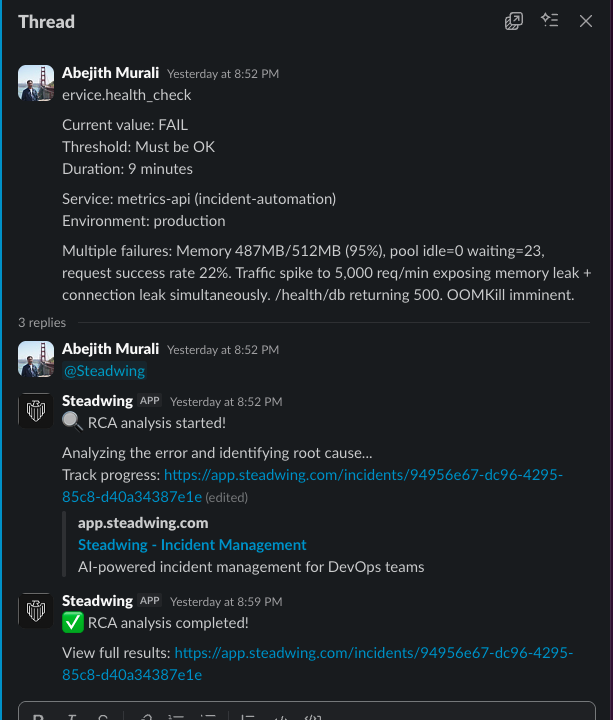 > **Image description:** A Slack thread where a monitoring alert appears, a team member replies with `@Steadwing`, and the Steadwing bot responds with an acknowledgment emoji and a link to the full RCA report.
### From Linear
1. Create or find an issue related to an incident
2. Either assign the issue to Steadwing, or @mention Steadwing in a comment
3. Steadwing performs RCA and posts results directly in Linear
### Paste an Error
1. Go to your [Steadwing Dashboard](https://app.steadwing.com)
2. Paste any error message, stack trace, or alert text
3. Steadwing analyzes it and generates the RCA
## How do I use Steadwing in my IDE?
Use Steadwing directly in your IDE via the [MCP Server](/steadwing-mcp). The MCP server works with Claude Code, Cursor, and other MCP-compatible tools.
* Analyze local code without GitHub authentication
* Get RCA insights directly in your development environment
* Enhanced performance when integrations are connected
Install from [Smithery](https://smithery.ai/server/@steadwing/mcp) and start analyzing code in minutes.
## What Happens Next?
After your first RCA, Steadwing starts learning from your incident history. Each incident makes the next one faster and more accurate. You'll get:
* **Instant RCA** when alerts fire
* **Evidence from all connected sources** - logs, metrics, traces, code changes
* **Short-term and long-term solutions** ready for approval
* **Conversational follow-up** - ask questions about any incident
## Need Help?
* Check our [Integrations](/integrations) page for detailed setup guides
* Visit the [MCP Server](/steadwing-mcp) page for IDE integration
* Contact us at [hello@steadwing.com](mailto:hello@steadwing.com) for support
> **Image description:** A Slack thread where a monitoring alert appears, a team member replies with `@Steadwing`, and the Steadwing bot responds with an acknowledgment emoji and a link to the full RCA report.
### From Linear
1. Create or find an issue related to an incident
2. Either assign the issue to Steadwing, or @mention Steadwing in a comment
3. Steadwing performs RCA and posts results directly in Linear
### Paste an Error
1. Go to your [Steadwing Dashboard](https://app.steadwing.com)
2. Paste any error message, stack trace, or alert text
3. Steadwing analyzes it and generates the RCA
## How do I use Steadwing in my IDE?
Use Steadwing directly in your IDE via the [MCP Server](/steadwing-mcp). The MCP server works with Claude Code, Cursor, and other MCP-compatible tools.
* Analyze local code without GitHub authentication
* Get RCA insights directly in your development environment
* Enhanced performance when integrations are connected
Install from [Smithery](https://smithery.ai/server/@steadwing/mcp) and start analyzing code in minutes.
## What Happens Next?
After your first RCA, Steadwing starts learning from your incident history. Each incident makes the next one faster and more accurate. You'll get:
* **Instant RCA** when alerts fire
* **Evidence from all connected sources** - logs, metrics, traces, code changes
* **Short-term and long-term solutions** ready for approval
* **Conversational follow-up** - ask questions about any incident
## Need Help?
* Check our [Integrations](/integrations) page for detailed setup guides
* Visit the [MCP Server](/steadwing-mcp) page for IDE integration
* Contact us at [hello@steadwing.com](mailto:hello@steadwing.com) for support