
Getting Started
- Sign up using your Google account at app.steadwing.com
- Add your integrations at app.steadwing.com/settings for the following apps currently available on Steadwing:
- GitHub
- Slack
- Sentry
- Datadog
- New Relic
- Google Cloud Platform (GCP)
For Developers: MCP Integration
If you’re a developer using AI-powered IDEs like Claude Code or Cursor, you can integrate Steadwing directly into your development environment using our MCP (Model Context Protocol) integration. This allows you to:- Analyze your local codebase without authentication
- Get real-time RCA insights in your IDE
- Optionally connect integrations for enhanced performance
Steps to Use Steadwing After Installation
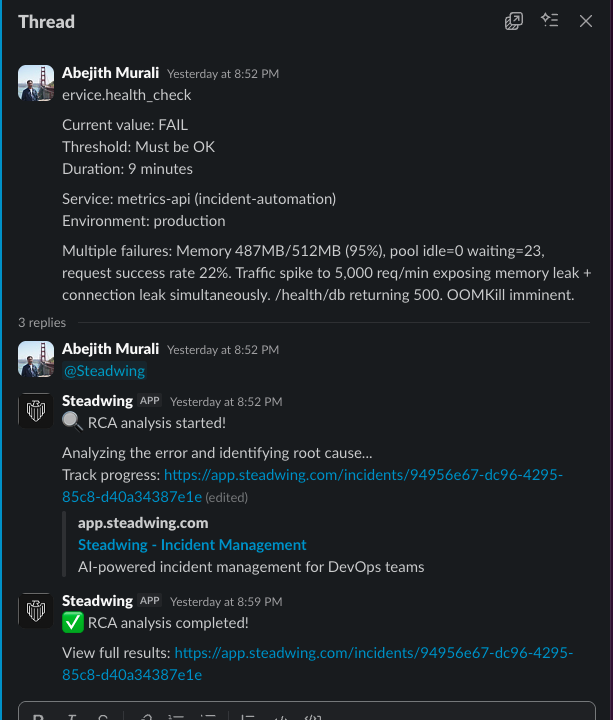
Once the setup above is complete, the Steadwing bot will be installed in your Slack workspace within your designated alerts channel. To trigger an RCA for a particular alert:- Simple reply to the alert message and tag Steadwing as
@Steadwing. - Steadwing will acknowledge the creation of an incident in the same thread with a link to it and start working on the RCA and its solutioning in the background.
- Once the RCA completes, Steadwing will notify you in the thread as well.
- Click the link shared by Steadwing to view detailed RCA results and suggested solutions.
Need help? Visit our Integrations page for detailed setup guides or reach out to us at [email protected]