
How do I set up Steadwing?
Sign up with Google OAuth, connect your tools, and trigger your first root cause analysis — all in under 5 minutes. No agents to deploy, no code changes required.1
Sign Up
Create your account at app.steadwing.com using Google OAuth. No credit card required.
2
Set Up Your Organization
Enter your organization name and invite team members. Admins can manage the org, members can investigate incidents - everyone stays in sync.
3
Connect Your Integrations
Connect your tools via OAuth in Settings. For best results, connect:
- GitHub (required) - For code change correlation
- One alerting/observability tool - Datadog, Sentry, New Relic, PagerDuty, or similar
4
Start Resolving Incidents
You’re ready! Trigger your first RCA from Slack, Linear, or paste any error directly into Steadwing.
Which integrations should I connect first?
For the best root cause analysis, connect these integrations:GitHub
Required - Correlate incidents with code changes, deployments, and releases
Slack
Trigger RCA by @mentioning Steadwing in any alert thread
Datadog or Grafana
Pull metrics, monitors, and APM data during analysis
AWS or GCP
Connect cloud infrastructure for resource and service insights
How to Trigger RCA
Once setup is complete, you have three ways to trigger root cause analysis:From Slack
- When an alert fires in your Slack channel, reply to the message
- Tag
@Steadwingin your reply - Steadwing acknowledges and starts the RCA in the background
- Once complete, Steadwing posts results in the same thread with a link to the full analysis
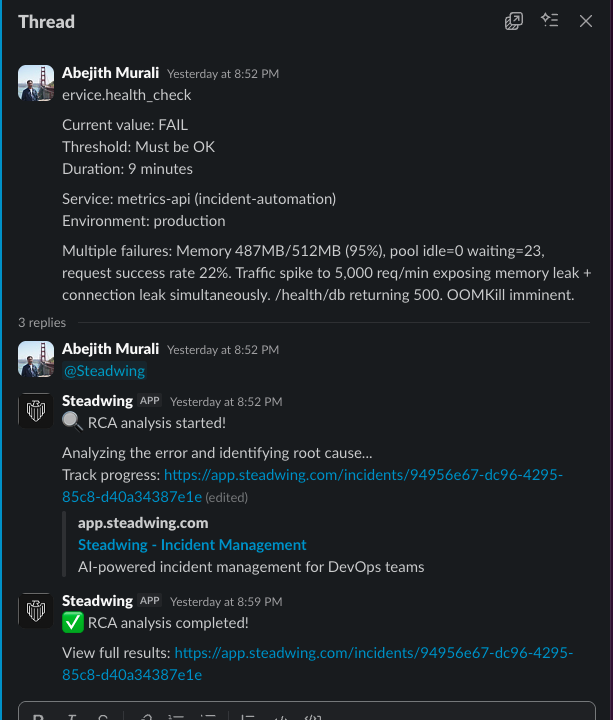
Image description: A Slack thread where a monitoring alert appears, a team member replies with @Steadwing, and the Steadwing bot responds with an acknowledgment emoji and a link to the full RCA report.
From Linear
- Create or find an issue related to an incident
- Either assign the issue to Steadwing, or @mention Steadwing in a comment
- Steadwing performs RCA and posts results directly in Linear
Paste an Error
- Go to your Steadwing Dashboard
- Paste any error message, stack trace, or alert text
- Steadwing analyzes it and generates the RCA
How do I use Steadwing in my IDE?
Use Steadwing directly in your IDE via the MCP Server. The MCP server works with Claude Code, Cursor, and other MCP-compatible tools.- Analyze local code without GitHub authentication
- Get RCA insights directly in your development environment
- Enhanced performance when integrations are connected
What Happens Next?
After your first RCA, Steadwing starts learning from your incident history. Each incident makes the next one faster and more accurate. You’ll get:- Instant RCA when alerts fire
- Evidence from all connected sources - logs, metrics, traces, code changes
- Short-term and long-term solutions ready for approval
- Conversational follow-up - ask questions about any incident
Need Help?
- Check our Integrations page for detailed setup guides
- Visit the MCP Server page for IDE integration
- Contact us at hello@steadwing.com for support